
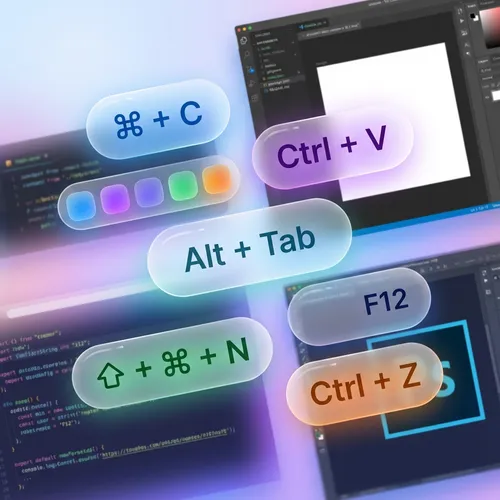
按键人人可见
再也不用重复“我正在按 Ctrl+C”。ScreenKey 会自动显示您执行的命令。
- 实时显示按键和组合键
- 整洁且高度易读的设计
- 支持国际键盘
适应您的风格
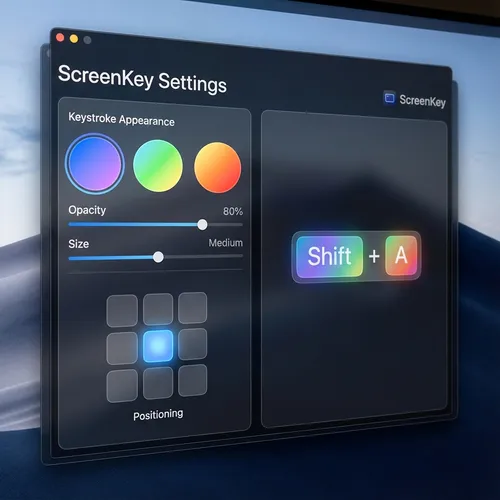
自定义按键出现的位置和方式。选择最适合您品牌的颜色、大小和显示时间。
- 灵活的屏幕定位
- 可调节的颜色和透明度
- 敏感按键过滤(密码)
深受创作者喜爱
看看我们的用户怎么说
"ScreenKey is perfect for my Photoshop tutorials. My students now know exactly which shortcuts I am using."
Ana Silva
YouTuber & Instructor
"I use it in all my code review meetings. It makes explaining complex terminal commands much easier."
João Duarte
Senior Developer
"Lightweight and does not interfere with computer performance. Essential for those who do productivity lives."
Carla Mendes
Tech Streamer
"The best tool for technical presentations. Setup is instant and the look is very clean."
Ricardo Lopes
Software Architect
"My Blender courses have become much easier to follow. The modifier key support is excellent."
Beatriz Soares
3D Designer
"Simple, elegant, and functional. Exactly what I needed for my remote classes."
Marcos Vinícius
University Professor
"ScreenKey is perfect for my Photoshop tutorials. My students now know exactly which shortcuts I am using."
Ana Silva
YouTuber & Instructor
"I use it in all my code review meetings. It makes explaining complex terminal commands much easier."
João Duarte
Senior Developer
"Lightweight and does not interfere with computer performance. Essential for those who do productivity lives."
Carla Mendes
Tech Streamer
"The best tool for technical presentations. Setup is instant and the look is very clean."
Ricardo Lopes
Software Architect
"My Blender courses have become much easier to follow. The modifier key support is excellent."
Beatriz Soares
3D Designer
"Simple, elegant, and functional. Exactly what I needed for my remote classes."
Marcos Vinícius
University Professor
"The best tool for technical presentations. Setup is instant and the look is very clean."
Ricardo Lopes
Software Architect
"My Blender courses have become much easier to follow. The modifier key support is excellent."
Beatriz Soares
3D Designer
"Simple, elegant, and functional. Exactly what I needed for my remote classes."
Marcos Vinícius
University Professor
"ScreenKey is perfect for my Photoshop tutorials. My students now know exactly which shortcuts I am using."
Ana Silva
YouTuber & Instructor
"I use it in all my code review meetings. It makes explaining complex terminal commands much easier."
João Duarte
Senior Developer
"Lightweight and does not interfere with computer performance. Essential for those who do productivity lives."
Carla Mendes
Tech Streamer
"The best tool for technical presentations. Setup is instant and the look is very clean."
Ricardo Lopes
Software Architect
"My Blender courses have become much easier to follow. The modifier key support is excellent."
Beatriz Soares
3D Designer
"Simple, elegant, and functional. Exactly what I needed for my remote classes."
Marcos Vinícius
University Professor
"ScreenKey is perfect for my Photoshop tutorials. My students now know exactly which shortcuts I am using."
Ana Silva
YouTuber & Instructor
"I use it in all my code review meetings. It makes explaining complex terminal commands much easier."
João Duarte
Senior Developer
"Lightweight and does not interfere with computer performance. Essential for those who do productivity lives."
Carla Mendes
Tech Streamer
下载 Windows 版?
Windows 10/11