Показывайте свои сочетания в
реальном времени
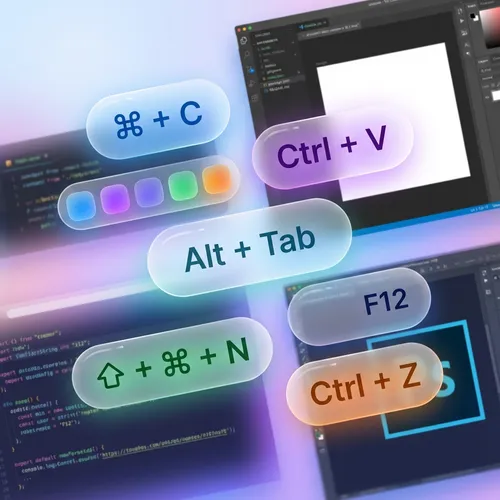
ScreenKey — незаменимый инструмент для презентаторов и инструкторов. Отображайте клавиши и сочетания прямо на экране, чтобы ваша аудитория видела каждую команду.

Клавиши видны всем
Больше не нужно повторять: «Я нажимаю Ctrl+C». ScreenKey автоматически отображает выполняемые вами команды.
- Отображение клавиш и комбинаций в реальном времени
- Чистый и легко читаемый дизайн
- Поддержка международных клавиатур
Адаптируйте под свой стиль
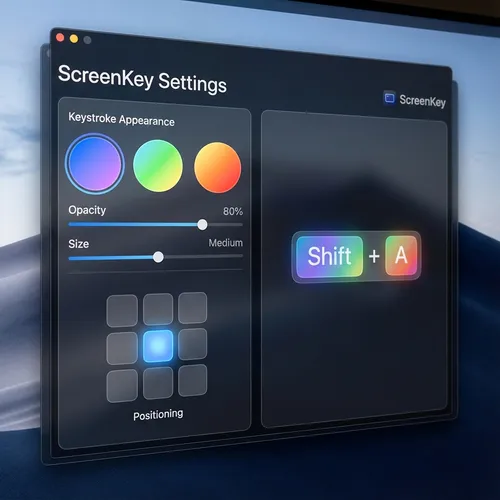
Настройте, где и как появляются клавиши. Выбирайте цвета, размеры и время отображения, которые лучше всего подходят вашему бренду.
- Гибкое позиционирование на экране
- Настраиваемые цвета и прозрачность
- Фильтрация конфиденциальных клавиш (пароли)
Любим авторами
Посмотрите, что говорят наши пользователи
"ScreenKey is perfect for my Photoshop tutorials. My students now know exactly which shortcuts I am using."
Ana Silva
YouTuber & Instructor
"I use it in all my code review meetings. It makes explaining complex terminal commands much easier."
João Duarte
Senior Developer
"Lightweight and does not interfere with computer performance. Essential for those who do productivity lives."
Carla Mendes
Tech Streamer
"The best tool for technical presentations. Setup is instant and the look is very clean."
Ricardo Lopes
Software Architect
"My Blender courses have become much easier to follow. The modifier key support is excellent."
Beatriz Soares
3D Designer
"Simple, elegant, and functional. Exactly what I needed for my remote classes."
Marcos Vinícius
University Professor
"ScreenKey is perfect for my Photoshop tutorials. My students now know exactly which shortcuts I am using."
Ana Silva
YouTuber & Instructor
"I use it in all my code review meetings. It makes explaining complex terminal commands much easier."
João Duarte
Senior Developer
"Lightweight and does not interfere with computer performance. Essential for those who do productivity lives."
Carla Mendes
Tech Streamer
"The best tool for technical presentations. Setup is instant and the look is very clean."
Ricardo Lopes
Software Architect
"My Blender courses have become much easier to follow. The modifier key support is excellent."
Beatriz Soares
3D Designer
"Simple, elegant, and functional. Exactly what I needed for my remote classes."
Marcos Vinícius
University Professor
"The best tool for technical presentations. Setup is instant and the look is very clean."
Ricardo Lopes
Software Architect
"My Blender courses have become much easier to follow. The modifier key support is excellent."
Beatriz Soares
3D Designer
"Simple, elegant, and functional. Exactly what I needed for my remote classes."
Marcos Vinícius
University Professor
"ScreenKey is perfect for my Photoshop tutorials. My students now know exactly which shortcuts I am using."
Ana Silva
YouTuber & Instructor
"I use it in all my code review meetings. It makes explaining complex terminal commands much easier."
João Duarte
Senior Developer
"Lightweight and does not interfere with computer performance. Essential for those who do productivity lives."
Carla Mendes
Tech Streamer
"The best tool for technical presentations. Setup is instant and the look is very clean."
Ricardo Lopes
Software Architect
"My Blender courses have become much easier to follow. The modifier key support is excellent."
Beatriz Soares
3D Designer
"Simple, elegant, and functional. Exactly what I needed for my remote classes."
Marcos Vinícius
University Professor
"ScreenKey is perfect for my Photoshop tutorials. My students now know exactly which shortcuts I am using."
Ana Silva
YouTuber & Instructor
"I use it in all my code review meetings. It makes explaining complex terminal commands much easier."
João Duarte
Senior Developer
"Lightweight and does not interfere with computer performance. Essential for those who do productivity lives."
Carla Mendes
Tech Streamer
Скачать для Windows?
Windows 10/11