ショートカットを
リアルタイムで表示
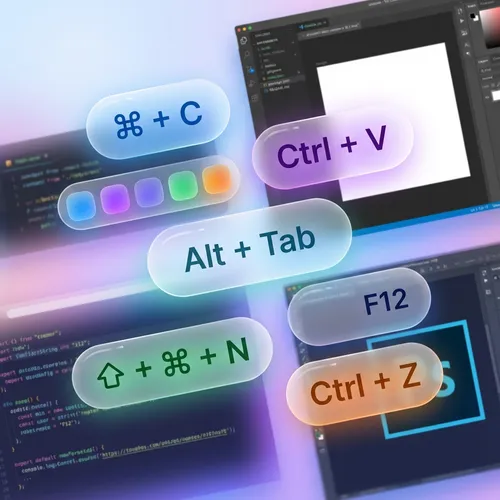
ScreenKey は、プレゼンターや講師にとって不可欠なツールです。キーやショートカットを画面に直接表示し、視聴者がすべてのコマンドを確認できるようにします。

すべての人がキーを確認可能
「Ctrl+Cを押しています」と繰り返す必要はありません。ScreenKey は実行したコマンドを自動的に表示します。
- キーと組み合わせのリアルタイム表示
- クリーンで読みやすいデザイン
- 国際キーボードのサポート
スタイルに合わせる
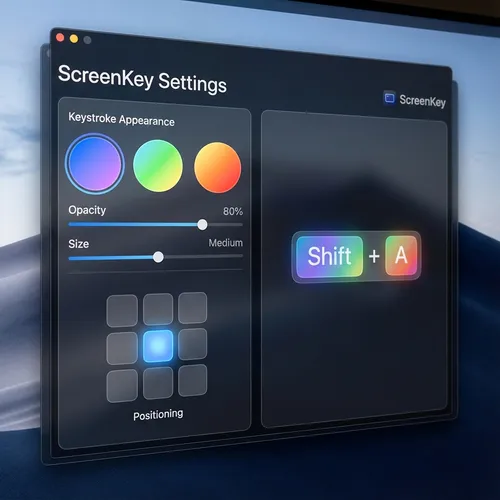
キーが表示される場所と方法をカスタマイズします。ブランドに最適な色、サイズ、表示時間を選択してください。
- 柔軟な画面配置
- 調整可能な色と透明度
- 機密キーのフィルタリング(パスワード)
クリエイターに愛されています
ユーザーの声をご覧ください
"ScreenKey is perfect for my Photoshop tutorials. My students now know exactly which shortcuts I am using."
Ana Silva
YouTuber & Instructor
"I use it in all my code review meetings. It makes explaining complex terminal commands much easier."
João Duarte
Senior Developer
"Lightweight and does not interfere with computer performance. Essential for those who do productivity lives."
Carla Mendes
Tech Streamer
"The best tool for technical presentations. Setup is instant and the look is very clean."
Ricardo Lopes
Software Architect
"My Blender courses have become much easier to follow. The modifier key support is excellent."
Beatriz Soares
3D Designer
"Simple, elegant, and functional. Exactly what I needed for my remote classes."
Marcos Vinícius
University Professor
"ScreenKey is perfect for my Photoshop tutorials. My students now know exactly which shortcuts I am using."
Ana Silva
YouTuber & Instructor
"I use it in all my code review meetings. It makes explaining complex terminal commands much easier."
João Duarte
Senior Developer
"Lightweight and does not interfere with computer performance. Essential for those who do productivity lives."
Carla Mendes
Tech Streamer
"The best tool for technical presentations. Setup is instant and the look is very clean."
Ricardo Lopes
Software Architect
"My Blender courses have become much easier to follow. The modifier key support is excellent."
Beatriz Soares
3D Designer
"Simple, elegant, and functional. Exactly what I needed for my remote classes."
Marcos Vinícius
University Professor
"The best tool for technical presentations. Setup is instant and the look is very clean."
Ricardo Lopes
Software Architect
"My Blender courses have become much easier to follow. The modifier key support is excellent."
Beatriz Soares
3D Designer
"Simple, elegant, and functional. Exactly what I needed for my remote classes."
Marcos Vinícius
University Professor
"ScreenKey is perfect for my Photoshop tutorials. My students now know exactly which shortcuts I am using."
Ana Silva
YouTuber & Instructor
"I use it in all my code review meetings. It makes explaining complex terminal commands much easier."
João Duarte
Senior Developer
"Lightweight and does not interfere with computer performance. Essential for those who do productivity lives."
Carla Mendes
Tech Streamer
"The best tool for technical presentations. Setup is instant and the look is very clean."
Ricardo Lopes
Software Architect
"My Blender courses have become much easier to follow. The modifier key support is excellent."
Beatriz Soares
3D Designer
"Simple, elegant, and functional. Exactly what I needed for my remote classes."
Marcos Vinícius
University Professor
"ScreenKey is perfect for my Photoshop tutorials. My students now know exactly which shortcuts I am using."
Ana Silva
YouTuber & Instructor
"I use it in all my code review meetings. It makes explaining complex terminal commands much easier."
João Duarte
Senior Developer
"Lightweight and does not interfere with computer performance. Essential for those who do productivity lives."
Carla Mendes
Tech Streamer
Windows版をダウンロード?
Windows 10/11