Affichez vos raccourcis en
temps réel
ScreenKey est l'outil essentiel pour les présentateurs et les formateurs. Affichez vos touches et raccourcis directement à l'écran pour que votre public suive chaque commande.

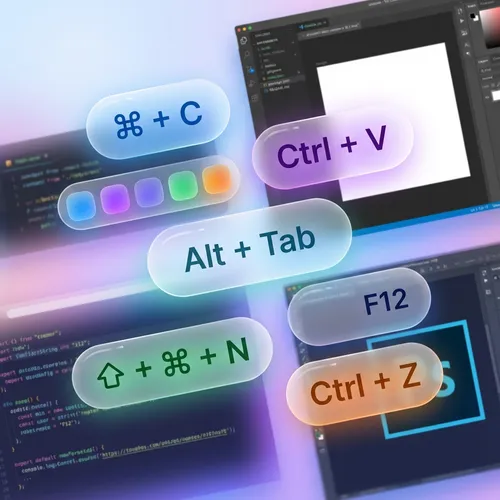
Des touches visibles par tous
Plus besoin de répéter "j'appuie sur Ctrl+C". ScreenKey affiche automatiquement les commandes que vous exécutez.
- Affichage en temps réel des touches et combinaisons
- Design épuré et très lisible
- Prise en charge des claviers internationaux
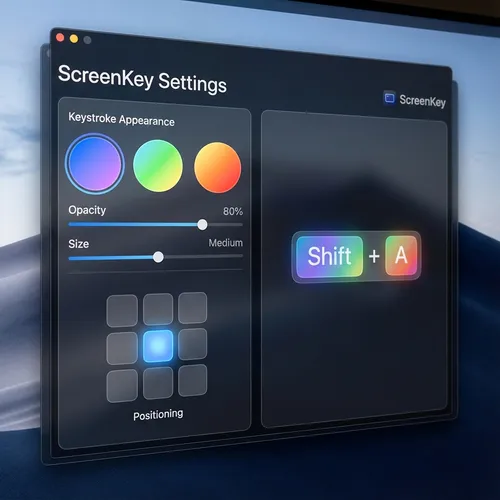
Adaptez-le à votre style
Personnalisez l'endroit et la manière dont les touches apparaissent. Choisissez les couleurs, les tailles et le temps d'affichage qui conviennent le mieux à votre marque.
- Positionnement flexible sur l'écran
- Couleurs et transparence ajustables
- Filtrage des touches sensibles (mots de passe)
Apprécié par les Créateurs
Découvrez ce que disent nos utilisateurs
"ScreenKey is perfect for my Photoshop tutorials. My students now know exactly which shortcuts I am using."
Ana Silva
YouTuber & Instructor
"I use it in all my code review meetings. It makes explaining complex terminal commands much easier."
João Duarte
Senior Developer
"Lightweight and does not interfere with computer performance. Essential for those who do productivity lives."
Carla Mendes
Tech Streamer
"The best tool for technical presentations. Setup is instant and the look is very clean."
Ricardo Lopes
Software Architect
"My Blender courses have become much easier to follow. The modifier key support is excellent."
Beatriz Soares
3D Designer
"Simple, elegant, and functional. Exactly what I needed for my remote classes."
Marcos Vinícius
University Professor
"ScreenKey is perfect for my Photoshop tutorials. My students now know exactly which shortcuts I am using."
Ana Silva
YouTuber & Instructor
"I use it in all my code review meetings. It makes explaining complex terminal commands much easier."
João Duarte
Senior Developer
"Lightweight and does not interfere with computer performance. Essential for those who do productivity lives."
Carla Mendes
Tech Streamer
"The best tool for technical presentations. Setup is instant and the look is very clean."
Ricardo Lopes
Software Architect
"My Blender courses have become much easier to follow. The modifier key support is excellent."
Beatriz Soares
3D Designer
"Simple, elegant, and functional. Exactly what I needed for my remote classes."
Marcos Vinícius
University Professor
"The best tool for technical presentations. Setup is instant and the look is very clean."
Ricardo Lopes
Software Architect
"My Blender courses have become much easier to follow. The modifier key support is excellent."
Beatriz Soares
3D Designer
"Simple, elegant, and functional. Exactly what I needed for my remote classes."
Marcos Vinícius
University Professor
"ScreenKey is perfect for my Photoshop tutorials. My students now know exactly which shortcuts I am using."
Ana Silva
YouTuber & Instructor
"I use it in all my code review meetings. It makes explaining complex terminal commands much easier."
João Duarte
Senior Developer
"Lightweight and does not interfere with computer performance. Essential for those who do productivity lives."
Carla Mendes
Tech Streamer
"The best tool for technical presentations. Setup is instant and the look is very clean."
Ricardo Lopes
Software Architect
"My Blender courses have become much easier to follow. The modifier key support is excellent."
Beatriz Soares
3D Designer
"Simple, elegant, and functional. Exactly what I needed for my remote classes."
Marcos Vinícius
University Professor
"ScreenKey is perfect for my Photoshop tutorials. My students now know exactly which shortcuts I am using."
Ana Silva
YouTuber & Instructor
"I use it in all my code review meetings. It makes explaining complex terminal commands much easier."
João Duarte
Senior Developer
"Lightweight and does not interfere with computer performance. Essential for those who do productivity lives."
Carla Mendes
Tech Streamer
Télécharger pour Windows?
Windows 10/11